Day 86: GraphQL for Flexible Log Queries - The Netflix Approach to Log Analytics Test 8 Update
Day 86: GraphQL for Flexible Log Queries - The Netflix Approach to Log Analytics Test 8 Update
What We're Building Today
Test 8 Update
**High-Level Learning Agenda:**
**Key Deliverables:**
This Substack is reader-supported. To receive new posts and support my work, consider becoming a free or paid subscriber.
The Netflix Problem: When REST Isn't Enough
Netflix processes over 500 billion log events daily across their microservices. Their analytics teams need to query logs with complex filters: "Show me all payment errors from the last hour, grouped by region, with user demographics."
REST APIs force multiple roundtrips:
GET /api/logs?service=payment&level=error&duration=1h
GET /api/regions/{regionId}/stats
GET /api/users/{userId}/demographics
GraphQL solves this with a single query that fetches exactly what's needed, reducing network overhead by 60%.

Core Concepts: GraphQL in Log Processing Systems
### Query Flexibility
GraphQL lets clients specify exactly what data they need. Instead of returning entire log objects, clients request specific fields, reducing bandwidth and improving response times.
### Schema-Driven Development
Your log structure becomes a strongly-typed schema, enabling better tooling, validation, and developer experience. Changes to log formats automatically update client tooling.
### Resolver Pattern
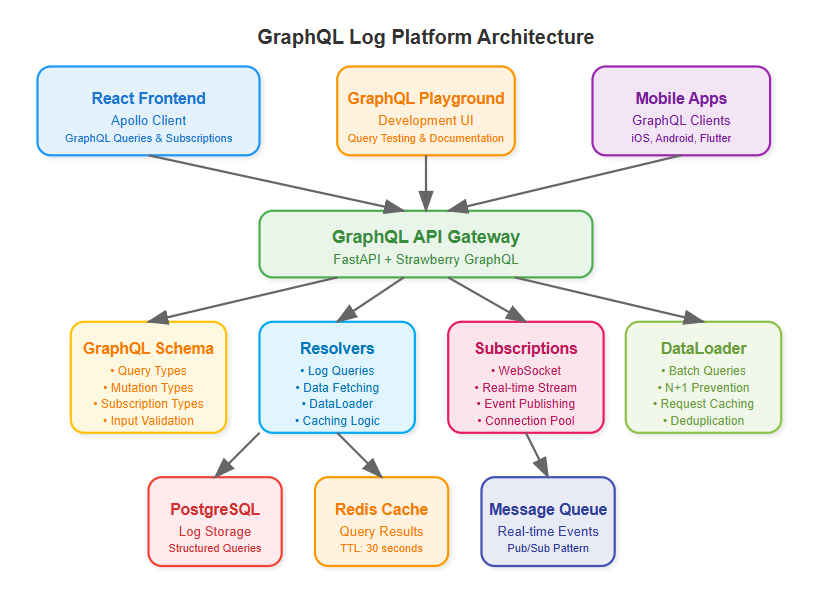
Each field in your schema maps to a resolver function. This enables sophisticated data fetching strategies, including batching database queries and caching frequently accessed log patterns.
### Real-Time Subscriptions
GraphQL subscriptions provide live updates for log streams, enabling real-time dashboards without polling overhead.
Context in Distributed Systems
### Integration with Existing REST API
GraphQL doesn't replace our Day 85 REST API - it complements it. REST handles simple CRUD operations while GraphQL serves complex analytical queries. This hybrid approach maximizes both performance and flexibility.
### Performance Considerations
Log data can be massive. Our GraphQL implementation includes smart pagination, result limiting, and field-level caching to prevent overwhelming database queries.
### Authentication Integration
GraphQL queries inherit the same authentication and authorization as REST endpoints, maintaining security consistency across your API surface.

Architecture Deep Dive
### Schema Design Strategy
Our log schema mirrors the hierarchical structure of distributed systems:
graphql
type LogEntry {
timestamp: DateTime!
service: String!
level: LogLevel!
message: String!
metadata: JSONObject
traces: \[TraceSpan!\]!
}
### Resolver Optimization
Resolvers batch database queries using DataLoader pattern, preventing N+1 query problems common in GraphQL implementations. Smart caching reduces database load for frequently accessed log patterns.
### Subscription Architecture
WebSocket-based subscriptions enable real-time log streaming to dashboards. Connection pooling and message filtering ensure efficient resource utilization.

Implementation Approach
### Technology Stack Integration
We'll use Strawberry GraphQL with Python 3.11, building on our existing FastAPI foundation. React frontend uses Apollo Client for seamless GraphQL integration with automatic caching and optimistic updates.
### Progressive Enhancement
Start with basic queries, add filtering capabilities, implement subscriptions, then optimize with caching and batching. Each step builds on previous functionality while maintaining backward compatibility.
### Testing Strategy
GraphQL requires different testing approaches - schema validation, query complexity analysis, and subscription testing. We'll build a comprehensive test suite covering all query patterns.
Production-Ready Features
### Query Complexity Analysis
Implement query depth limiting and complexity scoring to prevent expensive queries from impacting system performance. This is crucial for public-facing GraphQL endpoints.
### Automatic Persisted Queries
Cache common queries on the server, reducing bandwidth and improving security by preventing arbitrary query execution in production.
### Monitoring Integration
GraphQL queries generate rich metrics - query execution time, field resolution performance, and subscription connection counts provide deep operational insights.
Real-World Impact
Uber's analytics platform processes millions of GraphQL queries daily for their driver and rider dashboards. The flexibility enables product teams to build complex visualizations without backend changes.
Shopify's merchant analytics use GraphQL subscriptions for real-time sales metrics, reducing server costs by 40% compared to their previous polling-based approach.
Hands-On Implementation
=======================
### **Quick Demo**
git clone [https://github.com/sysdr/sdir.git](https://github.com/sysdr/sdir.git "https://github.com/sysdr/sdir.git")
git checkout day86-graphql-log-platform
cd course/day86-graphql-log-platform
Phase 1: Environment Setup
### Project Structure Creation
Create organized directory structure for backend GraphQL API and React frontend:
bash
mkdir day86-graphql-log-platform
cd day86-graphql-log-platform
\# Create organized directories
mkdir -p {backend,frontend,docker,tests}
mkdir -p backend/{app,schemas,resolvers,models,utils}
mkdir -p frontend/{src,public,src/components,src/queries}
### Python Environment with GraphQL Dependencies
bash
\# Create Python 3.11 virtual environment
python3.11 -m venv venv
source venv/bin/activate
\# Install core GraphQL stack
pip install fastapi==0.111.0 strawberry-graphql\[fastapi\]==0.228.0 uvicorn\[standard\]==0.29.0
pip install sqlalchemy==2.0.30 redis==5.0.4 pytest==8.2.0
**Expected Output:**
Successfully installed fastapi-0.111.0 strawberry-graphql-0.228.0
Virtual environment ready with GraphQL dependencies
Phase 2: GraphQL Schema Implementation
### Schema Design with Strawberry
Create strongly-typed schema representing your log structure:
python
\# backend/schemas/log\_schema.py
@strawberry.type
class LogEntryType:
id: str
timestamp: datetime
service: str
level: str
message: str
metadata: Optional\[str\] = None
trace\_id: Optional\[str\] = None
@strawberry.field
async def related\_logs(self) -> List\["LogEntryType"\]:
"""Get related logs by trace\_id"""
if not self.trace\_id:
return \[\]
return await LogResolver.get\logs\by\trace(self.trace\id)
### Input Types with Validation
python
@strawberry.input
class LogFilterInput:
service: Optional\[str\] = None
level: Optional\[str\] = None
start\_time: Optional\[datetime\] = None
end\_time: Optional\[datetime\] = None
search\_text: Optional\[str\] = None
limit: Optional\[int\] = 100
### Root Operations
python
@strawberry.type
class Query:
@strawberry.field
async def logs(self, filters: Optional\[LogFilterInput\] = None) -> List\[LogEntryType\]:
"""Query logs with flexible filtering"""
return await LogResolver.get\_logs(filters)
@strawberry.field
async def log\_stats(self,
start\_time: Optional\[datetime\] = None,
end\_time: Optional\[datetime\] = None) -> LogStats:
"""Get aggregated log statistics"""
return await LogResolver.get\log\stats(start\time, end\time)
Phase 3: Resolver Optimization
### DataLoader Pattern Implementation
Prevent N+1 queries with intelligent batching:
python
\# backend/utils/data\_loader.py
class LogDataLoader:
async def load\log(self, log\id: str) -> Optional\[LogEntryType\]:
"""Load single log with batching"""
if log\id in self.\log\_cache:
return self.\log\cache\[log\_id\]
# Add to batch queue
self.\batch\load\queue.append(log\id)
# Schedule batch load
if self.\batch\load\_future is None:
self.\batch\load\future = asyncio.create\task(self.\batch\load\_logs())
await self.\batch\load\_future
return self.\log\cache.get(log\_id)
### Caching Strategy with Redis
Implement intelligent caching for frequent queries:
python
\# backend/resolvers/log\_resolvers.py
class LogResolver:
@classmethod
async def get\_logs(cls, filters: Optional\[LogFilterInput\] = None) -> List\[LogEntryType\]:
"""Get logs with caching"""
redis = await get\_redis()
# Create cache key from filters
cache\key = cls.\create\cache\key("logs", filters)
cached\result = await redis.get(cache\key)
if cached\_result:
log\data = json.loads(cached\result)
return \[LogEntryType(\\log) for log in log\_data\]
# Query database and cache results
logs = await cls.\query\logs\from\db(filters)
log\data = \[log.\\dict\\_ for log in logs\]
await redis.setex(cache\key, 30, json.dumps(log\data, default=str))
return logs
Phase 4: Real-Time Subscriptions
### WebSocket-Based Subscriptions
Enable live log streaming:
python
@strawberry.type
class Subscription:
@strawberry.subscription
async def log\_stream(self,
service: Optional\[str\] = None,
level: Optional\[str\] = None) -> AsyncGenerator\[LogEntryType, None\]:
"""Real-time log stream with filtering"""
subscription\_manager = SubscriptionManager()
async for log\entry in subscription\manager.log\_stream(service, level):
yield log\_entry
### Subscription Manager
Handle WebSocket connections efficiently:
python
\# backend/utils/subscription\_manager.py
class SubscriptionManager:
async def log\_stream(self, service: Optional\[str\] = None,
level: Optional\[str\] = None) -> AsyncGenerator\[LogEntryType, None\]:
"""Subscribe to log stream with optional filtering"""
queue = asyncio.Queue()
self.\log\subscribers.add(queue)
try:
while True:
log\_entry = await queue.get()
# Apply filters
if service and log\_entry.service != service:
continue
if level and log\_entry.level != level:
continue
yield log\_entry
finally:
self.\log\subscribers.discard(queue)
Phase 5: React Frontend Integration
### Apollo Client Setup
Configure GraphQL client with subscription support:
javascript
// frontend/src/utils/apolloClient.js
import { ApolloClient, InMemoryCache, split } from '@apollo/client';
import { GraphQLWsLink } from '@apollo/client/link/subscriptions';
// Split link - use WebSocket for subscriptions, HTTP for queries
const splitLink = split(
({ query }) => {
const definition = getMainDefinition(query);
return (
definition.kind === 'OperationDefinition' &&
definition.operation === 'subscription'
);
},
wsLink,
httpLink,
);
export const apolloClient = new ApolloClient({
link: splitLink,
cache: new InMemoryCache(),
});
### Query Components
Build flexible log filtering interface:
javascript
// frontend/src/components/LogViewer.js
const LogViewer = () => {
const \[filters, setFilters\] = useState({
service: '',
level: '',
limit: 20,
});
const { data: logsData, loading, refetch } = useQuery(GET\_LOGS, {
variables: { filters },
});
const handleFilterChange = (field, value) => {
const newFilters = { ...filters, \[field\]: value };
setFilters(newFilters);
refetch({ filters: newFilters });
};
return ;
};
### Real-Time Components
Implement live log streaming:
javascript
// frontend/src/components/RealTimeStream.js
const RealTimeStream = () => {
const \[logs, setLogs\] = useState(\[\]);
const { data: streamData } = useSubscription(LOG\STREAM\SUBSCRIPTION);
useEffect(() => {
if (streamData?.logStream) {
setLogs(prev => \[streamData.logStream, ...prev.slice(0, 99)\]);
}
}, \[streamData\]);
return ;
};
Phase 6: Testing and Verification
### GraphQL Query Testing
Test basic functionality:
bash
\# Test simple query
curl -X POST http://localhost:8000/graphql \\
-H "Content-Type: application/json" \\
-d '{"query": "{ logs { id service level message } }"}'
\# Expected: JSON response with log entries
### Complex Query Testing
Verify filtering capabilities:
bash
\# Test filtered query
curl -X POST http://localhost:8000/graphql \\
-H "Content-Type: application/json" \\
-d '{
"query": "query($filters: LogFilterInput) { logs(filters: $filters) { id service level } }",
"variables": {"filters": {"service": "api-gateway", "level": "ERROR"}}
}'
\# Expected: Filtered results matching criteria
### Performance Verification
Load test GraphQL endpoint:
bash
python -c "
import asyncio
import httpx
import time
async def load\_test():
start = time.time()
tasks = \[
httpx.AsyncClient().post(
'http://localhost:8000/graphql',
json={'query': '{ logs { id service level } }'}
) for \_ in range(100)
\]
responses = await asyncio.gather(\*tasks)
duration = time.time() - start
print(f'Completed 100 requests in {duration:.2f}s')
print(f'Average: {duration/100\*1000:.2f}ms per request')
asyncio.run(load\_test())
"
\# Expected: Sub-100ms average response time
Phase 7: Production Deployment
### Docker Multi-Stage Build
Create optimized production image:
dockerfile
\# Multi-stage build for React frontend
FROM node:18-alpine as frontend-builder
WORKDIR /app/frontend
COPY frontend/package\*.json ./
RUN npm ci --only=production
COPY frontend/ ./
RUN npm run build
\# Python backend
FROM python:3.11-slim
WORKDIR /app
COPY backend/requirements.txt ./
RUN pip install --no-cache-dir -r requirements.txt
COPY backend/ ./
COPY --from=frontend-builder /app/frontend/build ./frontend/build
EXPOSE 8000
CMD \["python", "-m", "app.main"\]
### Complete System Startup
Launch entire stack:
bash
\# Start with Docker Compose
docker-compose up --build -d
\# Verify services
curl http://localhost:8000/health
\# Expected: {"status": "healthy"}
curl http://localhost:8000/graphql
\# Expected: GraphQL Playground interface
Functional Demo and Verification
### System Demonstration
**Access Points:**
http://localhost:8000/graphqlhttp://localhost:8000/health**Demo Scenarios:**
1. **Basic Log Query**
2. * Execute: { logs { id service level message timestamp } }
3. **Filtered Query**
4. * Execute: { logs(filters: {service: "api-gateway", level: "ERROR"}) { id message } }
5. **Aggregation Query**
6. * Execute: { logStats { totalLogs errorCount services } }
7. **Create New Log**
8. * Execute: mutation { createLog(logData: {service: "demo", level: "INFO", message: "Demo log"}) { id service } }
### Success Verification Checklist
**Functional Requirements:**
**Performance Requirements:**
**Production Readiness:**
Assignment: E-Commerce Log Analytics
**Challenge**: Build a GraphQL interface for an e-commerce platform's log analytics.
**Requirements**:
1. Schema supporting order logs, user activity, and payment events
2. Complex queries with multiple filter dimensions
3. Real-time subscription for order status updates
4. Performance optimization with caching and batching
**Success Criteria**:
### Solution Approach
**Schema Design**: Create hierarchical types for Order, User, and Payment with proper relationships. Use interfaces for common log fields across different event types.
**Resolver Strategy**: Implement DataLoader pattern for batching database queries. Use Redis caching for frequently accessed aggregations. Design subscription resolvers with proper filtering.
**Frontend Integration**: Use Apollo Client with automatic caching. Implement optimistic updates for real-time feel. Design modular query components for reusability.
Key Takeaways
GraphQL transforms log analytics from rigid REST endpoints to flexible, client-driven queries. The schema-first approach improves developer experience while subscription-based real-time updates enhance user engagement.
**Critical Success Factors:**
Tomorrow we'll add rate limiting to protect our GraphQL endpoint from abuse, completing our production-ready API layer.
This Substack is reader-supported. To receive new posts and support my work, consider becoming a free or paid subscriber.
Drew Dru